Sunday, February 9, 2020

Basic Introduction (Android Studio)

Android studio is an Integrated Development Environment (IDE) software tool for the Android platform. Android Studio was launched on May 16, 2013 at the Google I / O Conference by Google Product Manager, Ellie Powers.


This Android studio is free under Apache License 2.0. Android Studio initially started with version 0.1 in May 2013. Then beta version 0.8 was released which was released in June 2014. The most recent was released v.3 in October 2017. Based on JetBrainns' IntelliJ IDEA, Studio was designed specifically for Android Development. Now it can be downloaded for Windows, Mac OS X, and Linux. The free download location of this application is at https://developer.Android.com/studio/index.html?hl=en.

Download Android Studio for Windows (681Mb)

New features are expected to be added with each release of Android Studio. Here are some of the features provided in the current stable version:
》 Instant Run dramatically speeds up the editing, manufacturing and running cycles to keep your work "flowing".
》 The new Android Emulator 2.0 is faster than before and allows you to dynamically resize the emulator and access a set of sensor controls.
》 With Gradle, Android Studio offers high-performance application creation automation, robust dependency management, and customizable version configurations.
》 Android Studio provides a unified environment for developing applications for Android phones and tablets, Android Wear, Android TV, and Android Auto.
》 Start the project with code templates for patterns such as the navigation drawer and display pager, or import Google code samples from GitHub.

Read: https://knowledgefrans.blogspot.com/2020/02/hardware-requirements-
android-studio.html?m=1


Basic Program

Building an Android Application is very easy, the programming language used by Android is java. Not all java features are used, but only a part of java is often called the Dalvik Virtual Machine (DVM). Some small parts of the Android framework use the XML language for scripting.
1. Activity. A container for the User Interface (UI). An Android Application is built from one or several Activities.

2. Intent. Is the main messaging system that runs Android. Intent consists of actions that must be executed (Show, Change, Dial, etc) and Data. Intent is used to start activities and communication between parts of the Android system. An application can send or receive intents.

》 Send messages with intent
When an application sends an intent, the application gives a message telling Android to run something, for example an Activity from the application or running another application.

》 Registering the Intent Receiver
Sending messages with an Intent doesn't mean that the next thing will happen automatically. The application must register an intent receiver that pays attention to the intent and tells Android what to do. For example, if a user long presses on an image in the image gallery, a context menu will appear related to image sharing. Because there are several receivers that are registered relating to image sharing (email, messaging, Bluetooth, etc). Then the context menu is raised to give decision options to the user.

3. Cursorless Controls. Android devices use the user's fingers as input. If you use a mouse pointer on a computer, then left-click to interact with a button, then Android users can use their fingers directly to the button. To replace the right-click, Android users can press their finger for a long time on the screen, then the context menu will appear.

4. Views and Widgets. View is a basic UI (User Interface) element. For example the area of ​​the box on the screen that is responsible for displaying and receiving events (event handling).
Some examples of Widgets: (1) Button, (2) CheckBox, (3) DatePicker, (4) DigitalClock, (5) Gallery, (6) FrameLayout, (7) ImageView, (8) RelativeLayout, (9) PopupWindow.

5. Asynchronous Calls. Android has a class called AsyncTask that allows applications to run several operations at the same time without having to set how the thread runs specifically. AsyncTask allows developers to build clean model programs for asynchronous processes. Asynchronous processes are used for processes that require a long time, such as Network Communication (Internet), Media Processing, and various other processes that require users to wait. If the user has to wait, then the asynchronous process can be used to display a UI that tells the user what happened.

6. Background Services. Services are applications that run in the background and don't really have a UI, for example antivirus. Most music players from the Android Market run as Background Services where users can listen to music while checking e-mail or perform other tasks that require the use of screen displays.

Read: https://knowledgefrans.blogspot.com/2020/02/basic-introduction-android-studio.html?m=1


Versioning

The Android operating system consists of several versions. Each latest Android version has its own unique names and has several types of advantages ranging from display to security optimization. The following is a list of Android OS names by version.


1. Android version 1.0 was released on 23.09.2008.

2. Android version 1.1 was released on 09.02.2009.

3. Android version 1.5 Cupcake was released on 30.04.2009.
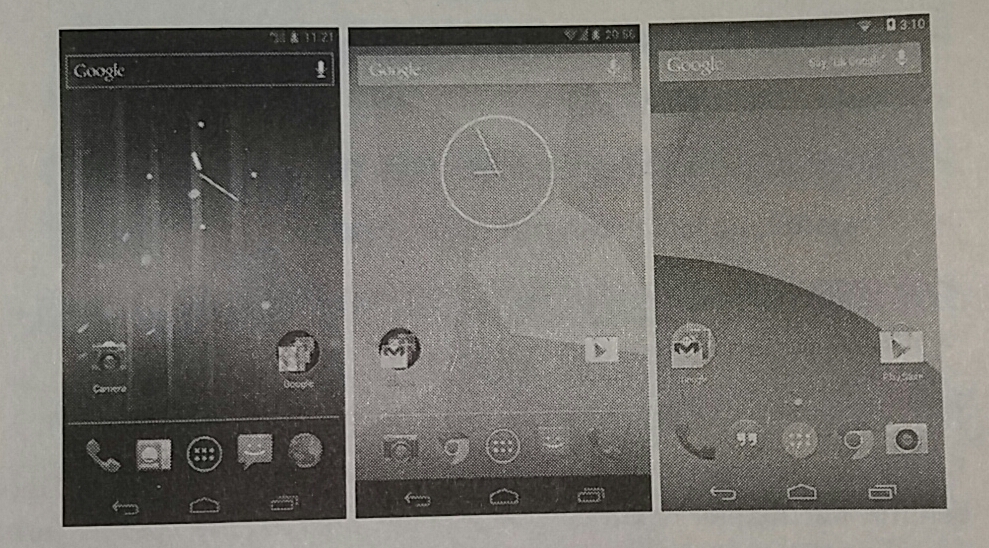
It is the first version to be released commercially and is also first named after the cake. This version of Android has just begun to add features that are commonly found today such as Widgets, Auto Rotate, and support for virtual keyboards from third parties. In this stage it can be said that Google is still trying to incorporate basic features.

4. Android version 1.6 Donut was released on 15.09.2009.
On Android Donut, smartphones get several additional features such as CDMA support, a text to voice engine, and a battery usage indicator. The version number that is not much different than before makes Android Donut more as a mini update.

5. Android version 2.0 Eclair was released on 26.10.2009.
There are quite a lot of changes compared to the initial Android version. In this update Google provides support and new features that function to make it easier for users. Android Eclair gets several new features that are mainly on the camera application by adding flash support, focus, to color effects. In this version Google also added a Live Wallpaper that is pretty cool at the beginning of its appearance.

Display Android Cupcake, Donut, and Eclair

6. Android version 2.2 Froyo, released on 10.05.2010
In this version, Android experienced significant performance optimization and added with USB Tethering support. Wi-Fi Hotspots, and push notifications are very useful to date. Also in this version we can move the application to external storage if possible.

7. Android version 2.3 Gingerbread is classified as the most successful, released on 06.12.2010.

        Display Android Froyo and Gingerbread

8. Android version 3.0 Honeycomb has the best appearance and best performance. Released 22.02.2011.
The current operating system is specific to tablet devices. In this Honeycomb some useful features still survive today such as the System Bar, multi-core processor support, to the customizable Home screen. Android 3.0 Honeycomb at launch looks very futuristic and attracts a lot of attention.

                 Display Android Honeycomb

9. Android version 4.0 Ice Cream Sandwich already supports Flash Player, released on 19.10.2011.
Google unifies smartphone and tablet devices and adds a more minimalistic interface. One of the interesting new features on this version of Android is Android Beam which allows fast data transfer using NFC.

10. Android version 4.1 Jelly Bean has advantages in battery, gesture navigation, and camera. Released 09.07.2012.
This version is more focused on improving performance and security. Most of the improvements in the Android version occur on the Android system itself. But there is one feature that really needs to be known, namely support 4K UHD resolution.
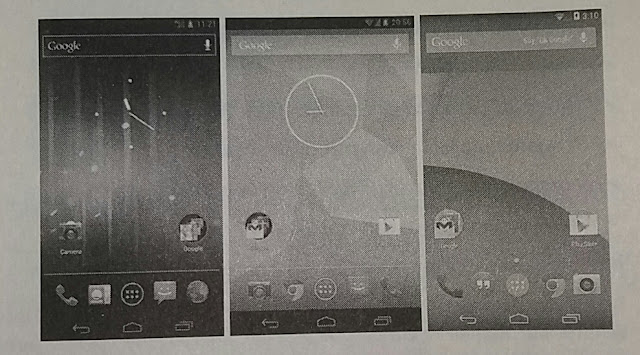

Display of Ice Cream Sandwich, Jelly Bean, and Kitkat

11. Android version 4.4 Kitkat released on 31.10.2013.
Focus on improving user experience and performance, especially on lower-class devices. Android 4.4 KitKat provides a minimum limit of available RAM for Android of 512 MB so that devices that have RAM below that are classified as low RAM devices. The newest features are:
》 Screen recording.
》 New Translucent UI system.
》 Improved notification access.
》 System-wide settings for closed captioning.
》 Performance improvement.
》 Activate Sprint Spark band 26 and band 41.
》 Repair vulnerabilities in Heartbleed / OpenSSL.

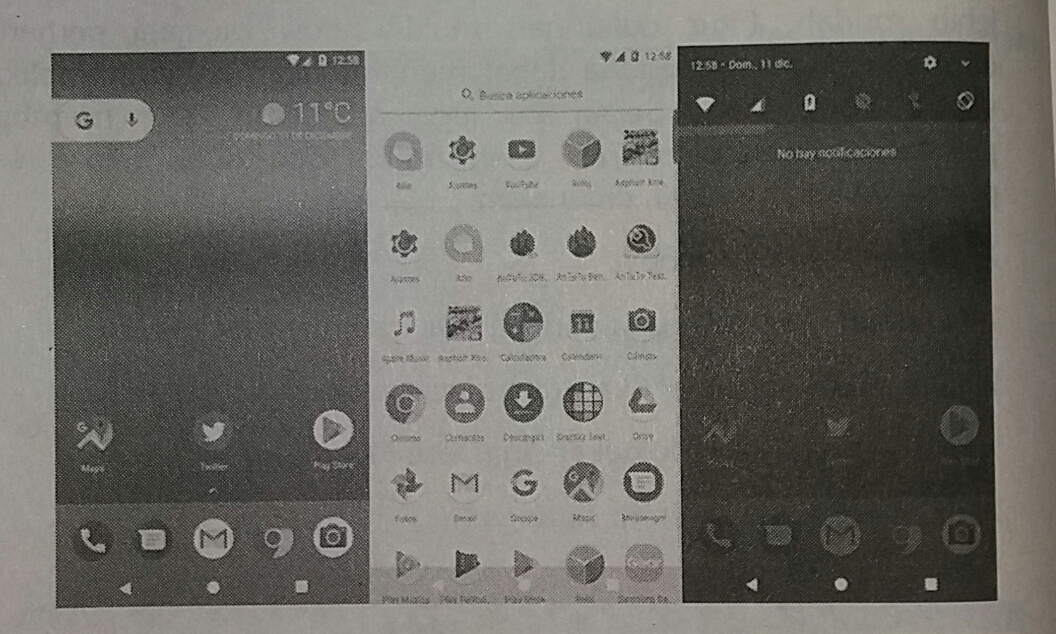
12. Android version 5.0 Lollipop released 17.10.2014.
It was the first time carrying a material design that is still a trend today. Its features are:
》 New design (Material).
》 Speed ​​increase.
》 Increased battery life.
》 Repair video playback and password failure.
》 Support Multi SIM cards.
》 Shortcuts in Quick settings for Wi-Fi and Bluetooth.
》 Security if the device is lost or stolen.
》 Use of High Definition sound for the phone.
》 Increased stability performance.

13. Android version 6.0 Marshmallow was released on 28.05.2015.
It further strengthens what has been done by Google so far through Android Lollipop. Through this latest operating system, Google brings powerful features that are very useful such as:
》 Support USB Type-C.
》 Support fingerprint authentication (Fingerprint).
》 Battery life is further enhanced by Doze's battery consumption management.
Dashboard Permissions dashboard.
》 Access the UI Tuner System.
》 Support payment systems with Android Pay that collaborate with Fingerprint Authentication so that security is guaranteed.
》 Additional Google Now functions that don't just serve voice commands.

14. Android version 7.0 Nougat introduced 22.08.2016.
Provides improvements to the user experience to make it easier. The multi-window support feature is a major concern so users can use several applications simultaneously. There are also features that make operating system updates smoother and less noticeable when the device is not in use.
》 Multi-window support.
》 Reply directly to messages from the notification window or menu.
》 Display new notification panel and quick settings.
》 Enhanced Doze Mode (Doze Mode 2.0).
》 Menu between system settings.

Display of Lollipop, Marshmallow, and Nougat

15. Android version 8.0 Oreo was officially released on 21.08.2017.
》 Android O is more focused on speed and efficiency.
》 Boot speed up 2X faster.
》 Picture in picture mode is more flexible than Android N.
》 Applications that are running in the background are tightened to save battery life.
》 The battery lasts longer.
》 Updated emojis and more.

Display Android Oreo

The following is a table of the number of Android users up to October 2017. The highest order is Android Marshmallow, Lollipop, Nougat, and Kitkat. When we choose that the application will be used on Marshmallow, it will be ensured that the most users will not get many problems when running the application that we offer.
In addition to the Android version, what we are considering is the screen size used. Currently the most popular is the normal screen with xhdpi. Please check the image below.

Android users based on the version

Android users by screen

Read: https://knowledgefrans.blogspot.com/2020/02/basic-program.html?m=1

Android features

Android devices have several hardware features in them. This is what developers can use in building applications.
Among others are:
1. Touchscreen. Android devices have a touchscreen feature that gives users the possibility to interact with applications using their fingers. Users can swipe, flip, drag, and pinch to zoom. Android also supports multitouch which means the entire screen can be touched with one or more fingers at the same time
2. GPS. The Android operating system supports GPS which allows developers to access user locations. Examples of applications that utilize GPS are map applications that show the user's location and provide instructions for getting to a location.
3. Accelerometer. Android supports the Accelerometer, which is a device used to measure acceleration. An accelerometer can tell when an Android device is moving, shaking, or reversing its position.
4. SD Card. Android has a feature that allows users or other applications to access (save or open) files on the SD Card. SD Card is a storage medium that is used by Android devices and several other mobile devices.
Android has many software features that can be used by developers in developing applications, namely:
1. Internet. The ability to access the internet on Android provides many advantages. Various information in real-time can be obtained easily with the internet. Users can access the internet to see movie show schedules, weather of an area, flight schedules and more. Developers can use the internet to access / update data in realtime. Developers can also use the internet to store various assets for later use in an application, such as by Pandora and Youtube. With the internet, an application model called client-server computing can be built. Another example, a map application accesses map and GPS data from a web server.
2. Audio and Video Support. The Android operating system allows developers to easily include audio and video in the application. Various standard audio and video formats are supported.
3. Contact. Android allows access to contacts stored on the device. For example, developers can build applications that combine contacts with GPS to provide notifications if a user is near the address of one particular contact.
4. Security. Android allows applications to do many things. Android also prepares security mechanisms in the form of permissions relating to several tasks. Example: To download an image and save it on the SD Card, you must first approve the permission to access the SD Card.
5. Google APIs. The Android operating system makes it possible to unlimitedly make phone calls, organize contacts or install applications. Developers can also integrate maps into an application by using the Maps API which contains Map Widgets. Various features can be added with the Maps API, including: (1) Displaying a location on the map, (2) getting a navigation guide, (3) data communication between applications and clouds.

Read: https://knowledgefrans.blogspot.com/2020/02/versioning.html?m=1

Why Choose Android

Choosing the Android operating system for mobile devices is appropriate because under Google it must be developed constantly. The most interesting thing is as a developer can also freely create Android-based applications. We can sell it as a product, service, or as a solution to the problem for its users.
Actually in addition to Android there are also other operating systems such as iOS, Linux, Blackberry, Symbian, and also Windows Mobile (WM). All have advantages and disadvantages. Android has proven the most widely owned today. In essence, there is no loss in choosing Android as a user or as a developer (program maker).
Android provides a rich development architecture. We don't need to know much about these architectural components, but we need to know what is available in the system used for our application. The following diagram shows the main components of the Android level system, an overview of the operating system, and the architecture of development.


The main component of Android

In the picture above:
1. Application: Applications are at this level along with core system applications for e-mail, SMS messaging, calendar, internet browsing or contacts.
2. Java API Framework: All Android features are available to developers through the application programming interface.
Display system is used to build application UI, including lists, buttons, and menus.
Referensi Reference Manager is used to access non-code resources such as strings, graphics, and layout files.
》 Notification Manager is used to display special warnings in the status bar.
Aktivitas Activity Manager that manages the application life cycle.
》 Material Providers that allow applications to access data from other applications.
》 All the framework APIs that are used by Android system applications.
3. Library and Android runtime: Each application runs in its own process and with its own Android Runtime instance, which allows multiple machines at once virtual on low-memory devices. Android also includes a series of core processing time libraries that provide most of the functionality of the Java programming language, including some features of Java 8 that are used by the Java API framework. Many core Android system services and components are built from native code that requires native libraries written in C and C ++. The native library is available for applications through the Java API framework.
4. Hardware Abstraction Layer (HAL): This layer provides a standard interface that shows the hardware capabilities of the device to a higher Java API framework. The Hardware Abstraction Layer consists of several library modules, each of which implements an interface for certain hardware components, such as a camera or bluetooth module.
5. Linux Kernel: The foundation of the Android platform is the Linux kernel. The layer above relies on the Linux kernel for basic functionalities such as threading and low-level memory management. Using the Linux kernel allows Android to take advantage of key security features and allows device manufacturers to develop hardware drivers for a well-known kernel.

Read: https://knowledgefrans.blogspot.com/2020/02/android-features.html?m=1


Saturday, February 8, 2020

What is Android?

Android is a Linux-based operating system designed for touch screen mobile devices such as smartphones and tablet computers. Android was originally developed by Android, Inc., with financial support from Google, which later bought it in 2005. The operating system was officially released in 2007, in conjunction with the establishment of the Open Handset Alliance, a consortium of hardware, software, and telecommunications that aim to advance the open standards of cellular devices. The first Android phone went on sale in October 2008.


Android display for Espier Launcher

Android user interface is generally in the form of direct manipulation, using touch gestures similar to real actions, such as sliding, tapping and pinching to manipulate objects on the screen, as well as virtual keyboards for writing text. In addition to touch screen devices, Google has also developed Android TV for television, Android Auto for cars, and Android Wear for watches. Each has a different user interface. The Android variant is also used on portable computers, game consoles, digital cameras, and other electronic equipment.

Various Android Products from Google

Read: https://knowledgefrans.blogspot.com/2020/02/why-choose-android.html?m=1


Wednesday, February 5, 2020

Material Sources of International Law

Sources of international law can be defined as the actual ingredients from which a legal expert determines the rule of law that applies to certain circumstances. These materials are included in five main categories or forms, namely:
1. Habits
2. Treaties
3. Court decisions or arbitration tribunals
4. Legal works
5. Decisions or determinations of organs of international institutions.

From a practical point of view, we can imagine a legal advisor at a Ministry of Foreign Affairs who is asked to provide opinions on international law relating to certain issues. His job was not at all like the work of a practicing lawyer who only had to do with national law. He does not have a Code, there is no statutory statute, and often he is in an uncertain environment either because of uncertainty about whether there has been a customary rule of international law or because of the absence of customs or practices and opinions that guide him to find the right way out. However, he must explore the law between these material "sources", assisted by his own logic and reasoning ability and sense of justice.
It can be seen that this practical approach has been taken by the courts which have decided on international legal issues. According to Article 38 (1) of the Court Statute, the International Court of Justice is ordered to apply the following sources:
1. International treaties
2. International customs, as evidenced by common practice, have been accepted as law
3. General principles of law recognized by civilized nations
4. Judicial decisions and the teachings of prominent scholars from various countries as an additional source for establishing rules of law.

The order of material in the articles of the Statute does not cover decisions of arbitral tribunals concerning legal matters, or decisions or stipulations of organs of international institutions, even though the article includes one material "general principles of law recognized by civilized nations ". These general principles of law were incorporated into the Court Statute to provide an additional basis for decisions in the event that other materials cannot help the Court. These "general principles" must be used in analogy and can be drawn by selecting concepts recognized by all national legal systems. That is the original purpose of the compilers of the Statute, which was emphasized in the context of Article 9, according to which the elected judges must remember that the Court must represent "the main forms of civilization and the main legal systems in the world", and the efforts made by several authors to give another interpretation of these words seems artificial and inconclusive. The legal propositions quoted and widely popularized do not in themselves constitute "general principles" in this sense. The revised edition of the American Law Institute's Restament of the Foreign Relations Law of the United States (1986) classifies "general principles" as an "additional source of international law".
On several occasions the Permanent Court of International Justice considers it necessary to apply or refer to such "general principles". Therefore in the Chrozow Factory (Indemnity) Case, the Permanent Court of International Justice applies the principle of res judicata and refers to the "general conception of law", that "every violation of an agreement issues an obligation to compensate". In the Mavrommatis Palestine Concessions Case. The Court referred to "general principles of subrogation", and in Case of the Diversion of Water from the Meuse, Judge Manly O. Hudson expressly argued that the Court could apply the Anglo-American doctrine of merit as "general principles". But at least on one occasion, the Court refused to apply what was considered "general principles" namely in the Serbian Loans Case where the Court stated that the principle known in English law as "estoppel" (detention of someone to prevent it from denying the previous statement) cannot be applied. On the other hand, the doctrine of civil law regarding trust is considered beneficial in relation to issues concerning the Mandate system and the Trusteeship system. "General principles" include procedures and principles of clarity (evidentiary), as well as the principles of substantive law, provided that these principles have some general characteristics in the context of certain legal systems that are generally owned. However, these "general principles" constitute a weak "source" of international law compared to a matter of judicial reasoning and logic which today is specifically prohibited from being used by the most influential international courts.
From a theoretical point of view, the provisions for applying "general principles" have been echoed as "sounding the death knell" for positivism, because they explicitly reject the positivist's broad view that the habits and treaties must be viewed as sources exclusive of international law. The provision was also stated to solve the problem of non-liquet, namely the inability of an international court to decide a case legally because it could not find a rule of law that could be applied. Finally, this provision is almost regarded as a provision that does not stipulate a new rule, except as something that is stated in nature regarding the practice of international courts that have lasted a long time.

ENGLISH PHRASES

YOUTUBE   ENGLISH PHRASES  no one said it was to be going easy.  tidak ada yang mengatakan itu akan berjalan mudah.  that wasn't the re...